Accessible Home Workouts for Hearing Loss and Deaf Adults
Build accessible home workouts with visual cues, accurate captions, device care, and preferences that differ for Deaf and hard-of-hearing adults.
Accessible home workouts for hearing loss work when the session is built around what you can see, pause, and verify. Prioritize clear visual instruction, accurate captions when speech or sounds matter, and a hearing-aid plan that follows your own device guidance. Deaf cultural preferences and hard-of-hearing needs are different starting points. They are not one shared checklist with the volume slider as the only fix.
Plenty of fitness videos still assume you can hear a coach over music, catch a side call mid-rep, or notice a doorbell under a timer beep. Training at home removes the commute and the crowded studio. It does not automatically remove those assumptions. The sharper question is what this session needs you to perceive, and how that information will arrive without guesswork.
Start from preference, not from one disability label
Evidence for this section: the culturally Deaf physical activity study and W3C media accessibility overview.
People use different words on purpose. Some adults identify as culturally Deaf and use a signed language as a primary language. Others describe themselves as hard of hearing, as having hearing loss, or as hearing-aid or cochlear-implant users in mostly spoken environments. Those experiences can overlap. The workout setup that fits still may not.
A 2025 qualitative study with nine culturally Deaf adults who used British Sign Language found barriers tied to hearing-designed spaces, limited Deaf-aware provision, and social exclusion. Enablers included social support and Deaf-led activity. The authors argued that Deaf identity should be considered when promoting physical activity. Those findings are from the culturally Deaf physical activity study. The sample is small and UK-specific, so it cannot speak for every person with hearing loss. It does push back hard against the idea that louder speakers solve the whole problem.
W3C’s media guide splits captions, transcripts, sign-language versions, and accessible players into separate components. That split is laid out in the W3C media accessibility overview. It travels well into living-room training. One person wants a signed instructor. Another wants accurate English captions plus a front-facing demo. Someone else wants a mute visual circuit with on-screen timers and no speech. Figure out which channel carries the instruction before you call the workout accessible.
Write the preference in one sentence before you press play. “I need the coach fully visible and no dependence on speech.” “I need reviewed captions for cues and timers.” “I want a signed session if one is available.” Keep that sentence nearby. It stops you from blaming your body for a format problem.
Why many classes feel inaccessible before the first squat
Evidence for this section: the culturally Deaf physical activity study and the qualitative hearing-loss physical activity study.
In the culturally Deaf focus groups, participants described gyms and classes where talking and loud rooms left them out. Relying on an interpreter could still feel othering while trying to move. Another theme was the shortage of dedicated Deaf spaces and Deaf-aware provision. Those are design problems. They are not evidence that Deaf adults lack motivation.
A separate qualitative study in middle-aged and older adults with hearing loss reported hearing-specific barriers such as mental fatigue, acoustically challenging environments, difficulties with hearing aids during activity, and perceived stigma. Facilitators included environmental modifications, hearing-loss-only groups, and hearing-loss self-efficacy. Those themes are summarized in the qualitative hearing-loss physical activity study. That population is not the same as the culturally Deaf BSL sample. Both papers still land in a similar place: sound-first coaching in noisy rooms is a brittle way to teach movement.
Home sessions can cut some of that friction. You can lower or drop background music, place the screen where the demo stays in view, pause without holding up a class, and pick a quieter room. Home is not magic. Camera angles still hide feet. Auto-captions invent cues. A sweaty device still needs care. Treat the room as something you can arrange, not as a finished accessibility feature.
If you like music during training, keep it optional rather than making the playlist carry the instructions. Our music for home workouts guide covers preference and listening exposure. This article stays on access to the workout itself.
Build the session around visual instruction
Evidence for this section: the hearing-aid exercise accessories study and UK Deaf Sport’s Deaf Active Online retrospective.
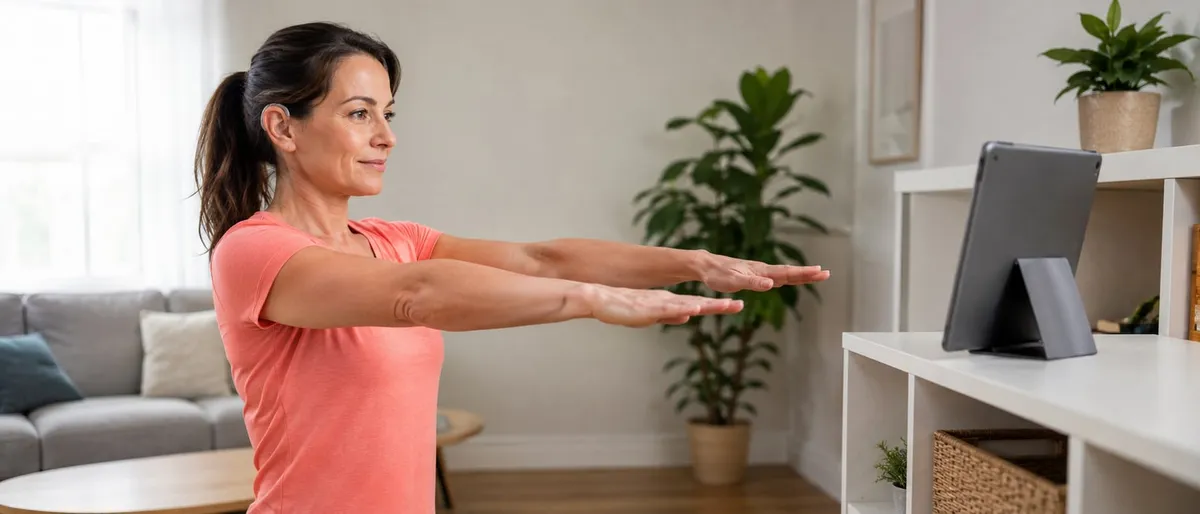
Visual instruction means the important information survives with the sound off. The coach’s body should show stance, range, tempo, and transitions. On-screen text can name the exercise, the target side, and the time left. If a demo only works when you also hear “left leg” or “ten more seconds,” the session is still audio-dependent.
In older adults studying hearing aids during physical activity, facilitators included aided hearing when people used it, an instructor who projected their voice, and instructors who demonstrated the moves. Barriers included reverberation, loud music, and the instructor’s location or orientation relative to participants. Both points come from the hearing-aid exercise accessories study. A home screen cannot repair a badly filmed class, but you can favor videos where the demo stays continuous and the camera does not cut away during the hard part of the rep.
UK Deaf Sport’s look-back on Deaf Active Online described remote sessions led by Deaf trainers for Deaf participants across yoga, HIIT, running, weights, and cardio. People had to manage flat screens, camera angles, and whether to show only the instructor, according to the Deaf Active Online retrospective. That retrospective is historical programme experience, not a controlled trial proving one platform raises fitness. It still shows that on-screen delivery needs deliberate setup.
Run these checks before the working sets:
- Can you see the coach’s feet and hands during the movements you will copy?
- Are left/right and next-exercise cues shown in text or obvious gesture, not only spoken?
- Can you pause, rewind about ten seconds, and resume without losing the plan?
- Is the timer visible, or does a beep do the only countdown work?
If a video fails those checks, switch to a written circuit, a slower tutorial, or a self-paced block. Guessing under fatigue is a bad bargain.
For watching your own form after a set, a short phone recording often helps more than trying to catch a coach’s mouth while balancing. See our home workout form-check guide for observation habits that do not depend on live audio cues.
Captions are not the same thing as translation
Evidence for this section: W3C captions guidance and WCAG captions understanding.
W3C explains captions as a text version of the speech and non-speech audio needed to understand the content, synchronized with the media. In that framing, captions are not merely a foreign-language subtitle track. Dialogue-only translation can leave out who is speaking, meaningful sound effects, music cues, or timer calls that change what you should do next.
WCAG’s understanding document for prerecorded captions makes the same core point: captions include dialogue and non-speech information conveyed through sound when that information matters. For a workout, that can mean “[timer beeps],” “[upbeat music starts],” or an off-screen coach saying “switch sides.” If those events drive the session and never appear visually, many Deaf and hard-of-hearing viewers are still missing instruction.
A workable split looks like this:
- Need access to English speech and workout-relevant sounds in English? Look for captions, ideally reviewed.
- Need another spoken language represented? That is often a subtitle or translation task, and it may still omit non-speech audio.
- Prefer a signed language as the primary channel? Look for a signed session or interpreter track rather than assuming captions replace that preference.
Watch placement too. Text that covers the coach’s feet, squat depth, or an on-screen timer creates a new barrier while cleaning up an old one. Accessibility is not a single toggle. It is whether the instruction stays usable while you move.
Treat auto-captions as a draft, not a finished access feature
Evidence for this section: W3C captions guidance and Section508 captions and transcripts guidance.
W3C states that automatically generated captions do not meet user needs or accessibility requirements unless they are confirmed to be fully accurate, and they usually need significant editing. Their example is blunt: missing a word such as “not” can reverse meaning. In exercise media, that risk shows up fast. “Do not bend the knee past here,” “rest,” “right arm,” and “hold” are short words with large consequences.
Section508 guidance for captions and transcripts likewise says current auto-captioning typically fails minimum standards for pre-recorded media because of grammar, spelling, and awkward breaks, so creators should edit. It also advises keeping captions readable and avoiding obstruction of important visual information. Both points appear in the Section508 captions and transcripts guidance. That federal resource is written for U.S. government content obligations. Borrow the quality advice when you choose a workout video. Do not treat this article as legal counsel about your own duties.
Preview one minute with sound off and captions on, then check whether exercise names, side cues, and timer language are correct before trusting auto-captions. That preview habit follows from W3C captions guidance on automatic captions. If errors appear, use a written plan for that session or find another video. If you keep watching, pause after every new movement and confirm the visual demo matches the text.
A transcript open beside the video can help while you learn a pattern seated. During standing balance or floor transitions, a long transcript is clumsier than short synchronized captions. Match the text format to the movement demand.
Hearing aids, moisture, heat, and retention without a universal rule
Evidence for this section: NIDCD hearing aid care guidance and the physical fit accessories study.
NIDCD’s hearing aid page includes care habits such as keeping hearing aids away from heat and moisture, cleaning them as instructed, avoiding hairspray while wearing them, and turning them off when not in use. It does not publish one exercise rule that everyone must remove devices for sweat or keep them in for every session. Manufacturer instructions and clinician advice still govern your specific model.
The qualitative accessories study in older adults found barriers related to reverberation, loud music, and instructor position. Facilitators included aided hearing, projected voice, and demonstrated moves. Preferred physical fit accessories in that sample included retention locks and hearing-aid sleeves. Least preferred included a glasses connector and stick-on tape. The authors emphasized a patient-centered approach because preferences differed. Those preference findings are in the physical fit accessories study. That is the opposite of a blog telling every reader to clip, sleeve, or remove on command.
At home, split the problem into three questions:
- Communication need: Do you want amplified speech for this video, or are you working visually?
- Device protection: Is this session likely to add heat, moisture, or dislodging movements?
- Retention: If you keep devices in, do you have an accessory or fit strategy your clinician supports?
A low-sweat strength session with a visual demo may not stress a device the same way a humid outdoor run does. Floor transitions can dislodge an aid even when sweat is modest. Watch your own setup. Do not promote one influencer’s remove-the-aids tip into medical policy.
If feedback, whistling, or discomfort appears, NIDCD notes common adjustment issues and points people back to an audiologist for fit and programming questions. An article cannot diagnose occlusion, feedback, or ear health.
Keep workout timers separate from household alerting
Evidence for this section: NIDCD assistive devices guidance and Section508 captions guidance.
NIDCD describes alerting devices that use sound, light, vibrations, or combinations to signal events such as doorbells, telephones, or alarms. Visual alert signalers and vibrating systems exist because missing those events has consequences outside the workout. An interval app that flashes “0:20” is not that kind of tool.
During a focused session it is easy to mute phones, face away from a door, or ignore a single beep. If you need awareness of visitors, children, or alarms while you train, set that up with the alerting method you already use. Do not hope the workout soundtrack covers it. Section508’s caption advice also reminds creators that meaningful non-speech audio should be represented when it matters. At home, the meaningful audio might be the doorbell, not the playlist.
Separate channels protect attention. You can stay with the set because the alert problem has its own path.
Choose a format with explicit decision criteria
Evidence for this section: UK Deaf Sport’s Deaf Active Online retrospective and the culturally Deaf physical activity study.
Pick the session type with criteria, not mood.
Deaf-led or signed sessions can reduce the translation tax of speech-heavy coaching. UK Deaf Sport’s retrospective highlights online classes led by Deaf trainers and notes participant comments about accessible BSL activity and community. Read that as programme experience and preference evidence. It does not prove every signed class is technically progressive, or that the same schedule still exists unchanged.
Captioned mainstream videos can work when captions are accurate, demos are clear, and you can pause. They fall apart when captions are wrong, late, or covering the movement, or when the coach teaches mostly by chatter.
Mute visual circuits with written steps suit people who want zero speech dependence. They need decent writing: named exercises, side, tempo or breath notes, and a clear end point.
Self-paced blocks help when you need extra time to check captions, adjust a device, or reset a camera. Follow-along blocks help when a short, familiar sequence benefits from external pacing and the visuals stay readable.
Decision shortcuts:
- Choose Deaf-led or signed when signed language is your primary access channel or community matters for sticking with the habit.
- Choose captioned video when speech cues matter and the caption quality survives a silent preview.
- Choose written or app-text circuits when you want full control of pace and no audio dependence.
- Change formats mid-week. Preference is allowed to be situational.
When you evaluate any app or video product, ask what access features exist today. Do not infer captions, transcripts, or sign support from soft marketing language. Our home workout app selection filter is about short-session fit. Add an access preview to that checklist before you pay for anything.
Limitations you should keep in view
Evidence for this section: the culturally Deaf physical activity study and the hearing-loss physical activity study.
This article cannot prescribe hearing-aid settings, diagnose ear symptoms, or certify that a caption track meets a legal standard for your workplace or school. WCAG and Section508 materials are standards and federal guidance contexts, not personal legal counsel.
The qualitative studies cited here use small samples and specific groups: culturally Deaf BSL users in one paper, middle-aged and older adults with hearing loss in another, older adult hearing-aid users in the accessories study. Findings describe themes and preferences. They do not measure whether a particular living-room HIIT video improves VO2 max.
UK Deaf Sport’s online programme notes are historical and self-reported. Comments about feeling positive or connected are participant feedback from that project. They are not universal outcome guarantees for every Deaf adult or every future platform.
Physical activity still has ordinary medical boundaries. The Physical Activity Guidelines for Americans provide population guidance for activity. See the current Physical Activity Guidelines. They do not replace clinician advice if you have symptoms, recent injury, dizziness related to vestibular issues, or device concerns that need professional review.
RazFit is not described here as a captioned, signed, or hearing-aid-integrated product. Run the access checks in this article on any tool you choose, including ours. Use the same media-access checks described by W3C’s media accessibility overview rather than assuming product features that are not documented.
A practical next step for this week
Pick one session and run an access rehearsal before the working set:
- Decide your communication preference in one sentence.
- Preview thirty to sixty seconds with sound off.
- Confirm captions or on-screen text if speech matters; confirm a continuous demo if you rely on vision.
- Set device care: keep, protect, or remove according to your own guidance, not a social media rule.
- Separate household alerts from the workout timer.
- Do the session only if the instruction remains understandable while you move.
If the rehearsal fails, change the format. That counts as a good decision, not a failed workout.
Medical and device note
Seek clinician or audiology guidance for ear pain, sudden hearing changes, persistent feedback, moisture damage concerns, dizziness, or any symptom that worries you during or after exercise. Accessibility planning is not medical treatment. Device cleaning, battery handling, and implant or aid settings belong with manufacturer instructions and qualified professionals.
Frequently Asked Questions
6 questions answered
01 Do I need captions for every home workout video?
If the video relies on spoken cues, music changes, or other audio you need to understand the session, captions or another equivalent are useful. Pure demonstration with on-screen text may already carry the instructions. Captions are an access tool, not a guarantee that every workout will fit your body.
02 Are auto-generated captions good enough?
Usually not without editing. Accessibility guidance treats automatic captions as a starting point that often mishears words, timing, and non-speech sounds. For exercise, a missing "not," a wrong side cue, or a missed timer call can change the task. Prefer reviewed captions or a written plan you can trust.
03 Should I remove my hearing aids before I sweat?
There is no universal remove-or-keep rule for every workout. NIDCD care guidance says to keep hearing aids away from heat and moisture and to follow manufacturer and clinician instructions. Some people keep aids in with retention accessories; others remove them for certain sessions. Decide with your own device guidance, not a blog rule.
04 What is the difference between captions and subtitles for workouts?
In W3C media guidance, captions are same-language text for speech plus relevant non-speech audio. Subtitles often mean translation into another language and may omit sound effects or speaker cues. A translated subtitle track is not automatically an accessibility caption track.
05 Is a Deaf-led class better than a captioned mainstream video?
It depends on your communication preference and goals. Some culturally Deaf adults prefer signed, Deaf-led sessions and community. Others who are hard of hearing may prefer accurate captions, visual demos, and quieter rooms. Neither format is universally best.
06 Can an exercise timer replace my home alert system?
No. NIDCD describes alerting devices that use light, sound, or vibration for doorbells, phones, and alarms. A workout countdown only tracks the session. Keep household alerts separate from exercise apps.
References
Sources
Expert perspective
Rahme, Folkeard, and Scollie report that older adults differed in how they used hearing aids and fit accessories during physical activity, and they emphasize a patient-centered approach when coaching device use for exercise rather than one rule for every person.
Mohamed Rahme, Paula Folkeard, and Susan Scollie · Qualitative study authors on hearing aids and physical fit accessories during exercise · National Centre for Audiology, Western University · Source: https://pubmed.ncbi.nlm.nih.gov/39878562/